

If you’ve spent any time researching cloud telephony or VoIP for your business, you’ve almost certainly come across the term “SIP trunking” usually mentioned alongside other technical-sounding terms without much explanation of what it actually means or why it matters for your business.
The good news: SIP trunking isn’t as complicated as it sounds, and understanding the basics can help you make better decisions about your business’s phone infrastructure particularly as you grow and your communication needs become more complex.
Starting with the Basics: What Is a “Trunk” in Telephony?
The term “trunk” predates VoIP entirely it comes from traditional telephony, where a “trunk line” referred to a connection carrying multiple simultaneous calls between two points, as opposed to a single phone line carrying one call.
Think of it like a highway versus a single-lane road. A single phone line is like a single-lane road one call at a time. A trunk is like a multi-lane highway many calls can travel simultaneously through the same connection.
What SIP Adds to the Picture
SIP stands for Session Initiation Protocol it’s the technical standard used to set up, manage, and end voice (and video) calls over the internet. When people talk about “SIP trunking,” they’re referring to using SIP to create that “multi-lane highway” of simultaneous call capacity, but over an internet connection rather than physical copper phone lines.
In practical terms, a SIP trunk is a connection between your business’s phone system (your PBX, whether on-premise or cloud-hosted) and your telecom/VoIP provider’s network a connection that can carry multiple simultaneous calls, all over the internet.
Why This Matters: Replacing Physical Phone Lines
Before SIP trunking became widespread, businesses that needed to handle multiple simultaneous calls had to lease multiple physical phone lines from their telecom provider each line typically handling one call at a time, each with its own monthly cost.
If your business needed to handle, say, 10 simultaneous calls (incoming and outgoing combined), you’d traditionally need something like 10 physical lines (or a PRI Primary Rate Interface circuit configured for that capacity), each representing a fixed cost regardless of whether all 10 were in use at any given moment.
SIP trunking replaces this with a flexible, software-defined approach: you configure a SIP trunk with a certain number of “channels” (simultaneous call capacity), and that capacity exists as a configuration setting rather than physical infrastructure. Need more capacity? In many cases, it’s a matter of adjusting your plan or configuration, not installing new physical lines.
How SIP Trunking Fits with Cloud PBX
For businesses using hosted/cloud PBX, SIP trunking is often happening “under the hood” the cloud PBX provider handles the SIP trunk connections to the broader telephone network, and your business simply interacts with the PBX through softphone apps and a dashboard, without needing to think about SIP trunk configuration directly.
However, SIP trunking becomes directly relevant in a few scenarios:
You have existing PBX infrastructure: If your business has an on-premise PBX system (perhaps an IP-PBX) and wants to connect it to a VoIP provider’s network for calling capacity rather than replacing the entire PBX SIP trunks are the connection mechanism.
You’re using specialized contact center software: Many contact center platforms, predictive dialers, and CRM-integrated calling systems connect to the telecom network via SIP trunks, giving the business more direct control over call routing, capacity, and integration with other systems.
You need very specific configuration control: Larger businesses or those with unusual requirements (specific routing logic, integration with multiple systems, very high call volumes) may prefer direct SIP trunk access for the flexibility it provides, rather than working entirely within a more constrained hosted PBX dashboard.
Key Concepts in SIP Trunking
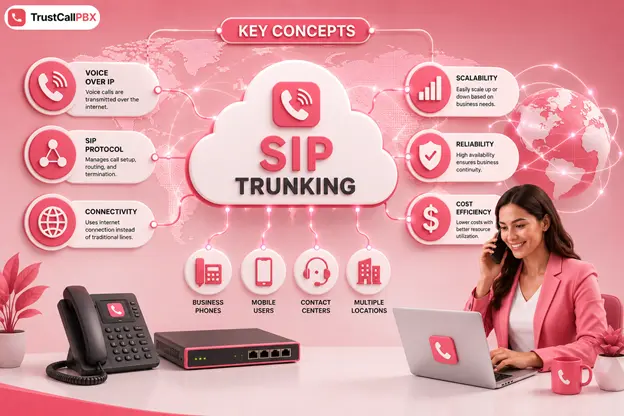
Channels (Concurrent Call Capacity)
A SIP trunk’s “channel” count determines how many simultaneous calls it can handle both inbound and outbound combined (or sometimes configured separately). If your business has 5 channels and is currently handling 5 calls, a 6th call attempt (inbound or outbound) would either fail or queue, depending on configuration.
For growing businesses, getting channel capacity right matters: too few channels and calls get blocked during busy periods; too many and you may be paying for unused capacity (depending on the pricing model).
DID Numbers and SIP Trunks
DID (Direct Inward Dialing) numbers the actual phone numbers customers dial to reach your business are typically associated with your SIP trunk configuration. A single SIP trunk can often support multiple DID numbers, all routing inbound calls through that trunk’s capacity to your PBX system.
Codec Support
Codecs determine how audio is encoded for transmission. Different codecs offer different tradeoffs between audio quality and bandwidth usage. G.711 is a widely-used codec known for high audio quality (often described as “HD audio” in marketing contexts), though it uses more bandwidth than compressed alternatives. For businesses where call quality is a priority sales calls, healthcare consultations, any scenario where misheard details matter codec support and quality matters.
Failover and Redundancy
For businesses where phone availability is critical, SIP trunk configurations can include failover options if the primary connection or route fails, calls automatically route through a backup path. This is particularly relevant for businesses in industries like energy, logistics, or critical services where communication downtime has serious operational consequences.
SIP Trunking vs Hosted PBX: Not Mutually Exclusive
It’s worth clarifying that SIP trunking and hosted PBX aren’t competing alternatives they’re complementary concepts that often work together.
A hosted PBX is the overall phone system extensions, call routing, voicemail, IVR, the dashboard you use to manage everything.
SIP trunking is the underlying connection mechanism that carries calls between that PBX system and the broader telephone network.
Most businesses using hosted PBX don’t need to think about SIP trunking directly it’s part of the infrastructure the provider manages. SIP trunking becomes a more direct consideration when businesses have their own PBX infrastructure (on-premise or self-hosted cloud PBX software) and need to connect it to a provider’s network for actual calling capacity.
When Growing Businesses Should Care About SIP Trunking Directly
For most small businesses, the hosted PBX dashboard experience is all that matters SIP trunking happens behind the scenes. But as businesses grow, certain scenarios bring SIP trunking into more direct relevance:
Integrating with specialized software: If your business adopts a CRM with built-in calling, a predictive dialer for sales outreach, or a custom contact center platform, these systems often connect via SIP trunks meaning you’ll need to understand and configure trunk settings (server addresses, credentials, channel limits) to connect that software to your telecom provider.
Multi-location businesses: Businesses with multiple offices or operational locations might use SIP trunks to connect each location’s local PBX infrastructure to a centralized telecom provider, while maintaining some location-specific configuration.
High-volume operations: Call centers and BPOs, as covered elsewhere, often need direct SIP trunk access to support the call volumes and integration requirements of their dialer/contact center software this is where “mass termination” capacity becomes directly relevant to SIP trunk configuration.
Cost optimization at scale: For businesses with significant call volumes, direct SIP trunk relationships with wholesale VoIP providers can offer better rates than working through additional layers of hosted PBX abstraction though this needs to be weighed against the additional configuration complexity.
Practical Considerations When Setting Up SIP Trunks
If your business does need to configure SIP trunks directly (rather than relying entirely on a hosted PBX dashboard), key things to get right include:
- Channel capacity planning: Based on your expected concurrent call volume (both inbound and outbound), ensure your trunk configuration provides adequate capacity with some buffer for peak periods.
- Authentication and security: SIP trunks need proper authentication (typically via IP whitelisting and/or username/password credentials) to prevent unauthorized use an unsecured SIP trunk can be exploited for toll fraud, where bad actors use your trunk to make calls at your expense.
- Codec configuration: Ensure your PBX/dialer software and the SIP trunk are configured to use compatible, quality codecs (like G.711) for the best call quality.
- Encryption (TLS/SRTP): As covered in the context of healthcare and general business security, ensure SIP trunk connections use TLS for signaling and SRTP for media encryption, particularly important if calls may contain sensitive information.
- Failover configuration: For business-critical calling, configure failover routes so that issues with the primary connection don’t result in complete loss of calling capability.
The Bottom Line

SIP trunking is, at its core, the modern replacement for physical phone lines a flexible, internet-based way to handle multiple simultaneous calls without the cost and inflexibility of traditional telecom infrastructure.
For most small businesses using hosted PBX platforms, SIP trunking is invisible infrastructure it’s just part of how the system works. But as businesses grow, integrate specialized calling software, or reach call volumes where direct provider relationships make economic sense, understanding SIP trunking becomes practically useful not as an academic exercise, but as the foundation for getting capacity, cost, and reliability right as communication needs become more complex.
For any growing business evaluating its phone infrastructure, even a basic understanding of SIP trunking helps make sense of provider conversations, pricing structures, and the technical requirements of integrating phone systems with the other software the business relies on.