
- Full Feature Suite
All The Features
You Need & More
TrustCall PBX is heavily packed with features that will streamline your business communications in the best possible way. Have a glance at the feature list below and realize why opting for TrustCall PBX can take your business to a whole new level.
1. Core PBX Calling Features
Engineered for par excellence solutions, ensuring your business reputation and connectivity are unmatched.
2. Call Routing & Automation
Engineered for par excellence solutions, ensuring your business reputation and connectivity are unmatched.
3. Advanced Calling & Productivity
Engineered for par excellence solutions, ensuring your business reputation and connectivity are unmatched.
4. Integrations & Intelligence
Engineered for par excellence solutions, ensuring your business reputation and connectivity are unmatched.
- Knowledge Hub
Technical Features FAQ
Yes. TrustCall PBX allows for stereo-channel recording of all traffic. You can store these recordings on our secure cloud or export them via API to your own storage.
IVR stands for Interactive Voice Response. It's the 'Press 1 for Sales' menu. You can configure this easily through our portal using a drag-and-drop designer.
Our platform supports unlimited extensions. You can assign them to physical desk phones, softphones on computers, or mobile apps.
Absolutely. We support webhooks and API integrations with popular CRMs like Salesforce, Zoho, and HubSpot, allowing for automated call logging and screen pops.
An auto dialer is really just the umbrella term. A predictive dialer is one specific flavor of it, the kind that dials several lines per agent at the same time and tries to guess when someone's about to free up, then only patches through the calls that actually get answered.
It does. Whether the connection runs through SIP trunking or the hosted PBX, third-party clients like Zoiper plug straight in, no forced switch to some proprietary app nobody's used before.
Pretty much, yes. Windows, Mac, iOS, Android, doesn't matter; the softphone app handles calling, transferring, conferencing, voicemail, all of it tied to the same extension a desk phone would've used anyway.
Call forwarding is narrow: one line or extension, unanswered, redirected somewhere else. Call routing sits above that; it's the whole set of rules deciding where an inbound call even goes to begin with, time of day, agent skill, queue position, that kind of thing.
Not even close, really. Voice broadcasting just fires a recorded message out to a list, no agent on the other end at all. A predictive dialer's whole job is getting a live agent onto a live, answered call.
Not usually. A five-person team is typically better served by a power dialer or progressive dialer. Call center dialers add compliance and queue-monitoring features built for much larger outbound volume.
Scalability &
Global Deployment
Whether you need a hybrid setup or 100% cloud scaling, TrustCall PBX is built to accommodate the most demanding enterprise architectures.
Multi-Country DID Support
A global company offers local presence in US, UK, AU, and EU.
API & Webhook Support
Automatically create tickets in helpdesk software after missed calls.
Cloud/On-Premise Hybrid
Keep sensitive data on-premise while scaling in the cloud.
Call Features, Softphones, and Auto Dialer Software for Every Team
Routing, recording, dialing. The three things a phone system actually needs to do well, and the three things most providers half-build. TrustCall PBX covers all of it: IVR and call routing on the inbound side, a softphone app on every device, and auto dialer software built for teams that spend the day on outbound calls.
Call Features: IVR, Routing and Recording
Interactive Voice Response (IVR) and IVR Systems
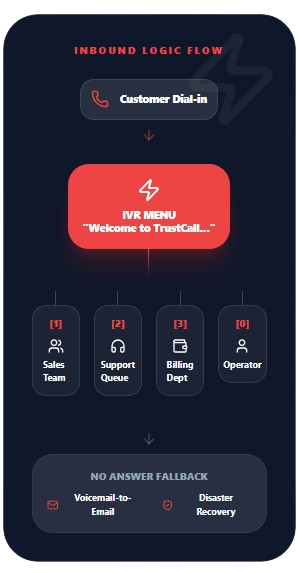
“Press 1 for sales, press 2 for support.” Everyone knows that version of an IVR system, and honestly most people picture nothing beyond it. But a decent IVR software build handles a lot more than a menu tree these days. Multi-language prompts. Rules that change depending on the hour. A CRM lookup that fires before the call even lands on a rep’s screen, so whoever picks up already knows who’s on the line and why they’re probably calling.
Setting one up doesn’t require a developer. TrustCall PBX’s IVR builder works as a drag-and-drop flow, so a call gets rerouted, a new prompt gets recorded, or an after-hours message gets updated without opening a ticket.
Call Routing and Call Queue Management
Call routing decides where an inbound call lands: a specific extension, a ring group, or a call queue if every agent is busy. TrustCall PBX supports several routing logics:
- Round robin: spreads calls evenly across available agents
- Skills-based: routes by agent expertise, not just availability
- Time-based: different routing for business hours versus after hours
- Geographic: routes callers to the nearest branch or team
Nobody likes being put on hold, but a call queue at least tells you where you stand: hold music, a spot-in-line announcement, maybe an estimated wait. Beats getting bounced to voicemail the second every agent’s tied up.
Call Forwarding and Click to Call
Call forwarding is the simple one. Primary line goes unanswered, the call jumps to a mobile number, another extension, or a whole different office. Set it up once and forget about it, it just runs.
Click to call flips the whole process around. A phone number sitting inside a webpage, an email, a CRM record, whatever, becomes a live call the second someone clicks it. No dialing, no copying a number into a phone app first. For a rep working straight down a lead list all day, that saved second or two per call actually adds up.
Call Recording Software and Call Tracking Software
Call recording software captures conversations for training, dispute resolution, and quality review. TrustCall PBX stores recordings with searchable metadata (date, agent, duration, outcome) so pulling one call out of ten thousand takes a search, not an afternoon.
Call tracking software goes further, attaching each inbound call back to the marketing source that generated it. A business running paid ads alongside organic search traffic can see, call by call, which channel is actually converting.
Voicemail to Email
Does anyone still dial into a voicemail box and punch in a PIN to check messages? Voicemail to email skips that entirely, drops the audio file and a transcript straight into the inbox where the message actually gets read.
Softphone Apps for Every Device
What a Softphone Actually Is
Skip the desk phone entirely. A softphone turns whatever’s already sitting on the desk- a laptop, a phone- into a full business extension. Log in on a different device tomorrow and the same extension, call history, voicemail, all of it just follows you over.
Softphone for Windows, Mac and Android
There’s a softphone for Windows, a softphone for Mac, and a softphone for Android, one for iOS too. TrustCall PBX covers all four so nobody’s stuck buying new hardware just because the last hire happens to use a Mac. One login, same account, works the same regardless of what’s under the hood. A new remote hire needs credentials on day one, not a desk phone sitting in a shipping box somewhere.
SIP Softphone vs. VoIP Softphone: Is There a Difference?
Not really, in practice. A SIP softphone and a VoIP softphone both describe the same category of app, one that connects over SIP protocol to place and receive calls through the internet rather than a phone line. The terms get used interchangeably across the industry, and TrustCall PBX’s softphone app works under either name.
Zoiper Softphone and Other Popular Clients
Some teams already have a preferred softphone app, Zoiper softphone being one of the more common ones in use. TrustCall PBX’s SIP trunking and hosted PBX both connect to third-party clients like Zoiper, so switching providers doesn’t force a switch in the app agents already know how to use.
Choosing the Best Softphone for Business
What actually separates a good softphone for business from a mediocre one:
| Feature | Why it matters |
|---|---|
| Call quality under low bandwidth | Keeps calls clear on hotel wifi or a weak signal |
| CRM integration | Pulls up caller info automatically |
| Multi-device sync | Same call history on desktop and mobile |
| Hold, transfer, conference | Table stakes, but not every app does it cleanly |
| Recording controls | Start and stop recording mid-call |
Virtual Office Phone Number Through a Softphone
A virtual office phone number lives on the softphone, not on a physical desk. A business can run an entire office presence, main line, extensions, auto attendant, off laptops and phones with zero desk hardware anywhere in the building.
Auto Dialer and Power Dialer Software
Predictive Dialer vs. Progressive Dialer vs. Power Dialer
The three most common auto dialer software types do different jobs, and mixing them up leads to buying the wrong tool:
- Predictive dialer: dials multiple numbers per agent simultaneously, predicting when an agent will free up, and connects only answered calls. Best for high-volume outbound campaigns where some abandonment is acceptable.
- Progressive dialer: dials one number per available agent, one at a time, with zero overlap. Lower call abandonment, slightly lower call volume per hour.
- Power dialer: sits between the two. An agent controls pacing more directly while the system still automates the dialing itself.
Outbound Dialer and Sales Dialer Tools
An outbound dialer removes manual number entry entirely, working straight through an uploaded list. A sales dialer adds the layer sales teams specifically need on top of that: call disposition tracking, automatic follow-up scheduling, and CRM logging that happens without a rep typing notes after every call.
Auto Dialer for Call Center Use
A call center dialer, or auto dialer for call center operations specifically, needs to handle volume a small sales team never will: hundreds of agents, real-time queue monitoring, and compliance features like do-not-call list scrubbing built in rather than bolted on. TrustCall PBX’s call center dialer scales from a five-person outbound team to a full floor without a platform migration in between.
Voice Broadcasting
Voice broadcasting sends a pre-recorded message to a large list of numbers at once, useful for appointment reminders, event notifications, or emergency alerts where a live agent isn’t the point. No dialer queue, no agent time, just the message reaching the list.
Cloud Dialer Setup
A cloud dialer runs entirely hosted, with no on-premise server managing the call queue. TrustCall PBX’s cloud dialer connects straight into the same SIP trunking and hosted PBX infrastructure already covered on the services page, so outbound campaigns and inbound call handling run through one platform instead of two disconnected systems.
Which Dialer Fits Your Team
| Team type | Recommended dialer |
|---|---|
| Small sales team (1–10 reps) | Power dialer or progressive dialer |
| High-volume outbound sales | Predictive dialer |
| Call center (50+ agents) | Auto dialer for call center, predictive mode |
| Appointment reminders/alerts | Voice broadcasting |
| Mixed inbound/outbound teams | Cloud dialer paired with IVR and call routing |
Streamline Your Business Today
From enhancing connectivity to improving reputation, our feature list serves you with par excellence solutions.